Local — No cloud. No telemetry.

Your AI CLI
Usage, Unified

Monitor Claude, Codex, and Antigravity CLI in one local dashboard. Real-time collection, smart retry, and live server logs — running entirely on your machine.

Works with Claude Codex Antigravity CLI
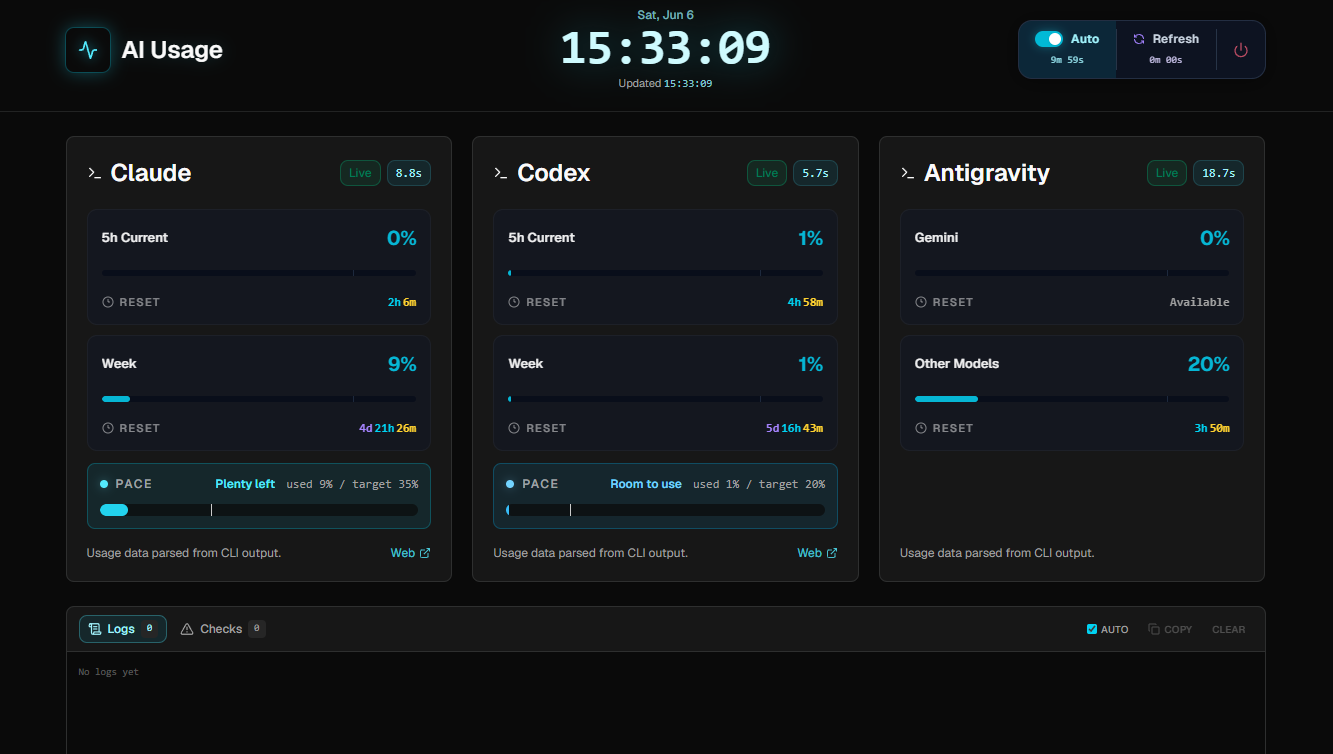
127.0.0.1:5173
AI Usage Dashboard
3
Providers
Retry Attempts
10m
History Buckets
Features

Everything you need
to track AI usage

For developers running multiple AI CLIs locally. No accounts, no API keys, no data leaving your machine.

Multi-Provider Collection

Runs Claude /usage, Codex /status, and Antigravity /usage in virtual terminals — no API keys needed.

Smart Retry Logic

Up to 5 attempts per provider with phase diagnostics. Re-enters slash commands automatically if they disappear mid-session.

Weekly Pace Card

Compare your actual usage bar against a 20% minimum threshold marker to stay on track throughout the week.

Reset Countdown

Live per-provider countdown to the next usage reset — always know how much runway you have left.

📡

Live Server Logs

SSE-based real-time log panel via /api/server/logs. Streams directly to the browser, no polling required.

Dual Cache

Server-side JSON history in 10-minute buckets plus browser localStorage fallback for instant first paint.

Quick Start

Up in four steps

Install and authenticate the CLIs you want to monitor, then install the dashboard.

1
Install CLIs
Install whichever AI CLI tools you want to monitor.
# pick the ones you use
irm https://claude.ai/install.ps1 | iex
npm i -g @openai/codex
irm https://antigravity.google/cli/install.ps1 | iex
2
Authenticate
Run each CLI once and complete the login flow. Required before the dashboard can collect data.
cd %USERPROFILE%
claude → OAuth → /exit
codex → setup → exit
agy → setup → exit
3
Install Dashboard
One-liner handles git, Node.js, and pnpm automatically.
irm …/install.ps1 | iex
4
View Usage
Dashboard opens at localhost:5173 — usage data refreshes every 10 minutes.
start-server.ps1 -Open
→ http://127.0.0.1:5173
one-liner · powershell
irm https://raw.githubusercontent.com/savvy773/ai_usage/main/scripts/install.ps1 | iex
manual install
# clone & install
git clone https://github.com/savvy773/ai_usage.git
cd ai_usage
pnpm install

# start dashboard
.\scripts\start-server.ps1 -Open
options
start-server.ps1 -Open
  # open browser automatically

start-server.ps1 -Port 5173
  # use a custom port

start-server.ps1 -Mode preview
  # production preview build

start-server.ps1 -Status
  # show server status
Tech Stack

Built with modern tools

Minimal runtime dependencies. SvelteKit handles the heavy lifting — the browser just renders.

SvelteKit 2
Tailwind CSS v4
TypeScript
shadcn-svelte
node-pty
Vite 8
Geist Font